Best Wireless Keyboard and Mouse Combos for Offices (2026)
The best wireless keyboard and mouse combo for office work in 2026 is the Logitech MK295 Silent: its SilentTouch keys cut typing and clicking noise by more than 90% versus the MK270, it runs up to 36 months on a set of batteries, and it costs about $35. Need multi-device switching or a palm rest? The MK850 Performance costs $80.
As an Amazon Associate I earn from qualifying purchases.
TL;DR — the short verdict: Buy the Logitech MK295 Silent for video calls and shared offices. Buy the Logitech MK270 for the cheapest reliable combo at about $20. Buy the Logitech MK470 Slim for a small desk. Buy the Logitech MK850 Performance to switch between computers. Buy the Microsoft Sculpt Ergonomic Desktop if your wrists hurt by 4 p.m.
What makes a wireless keyboard and mouse combo good for office work?
A good office combo is quiet first, comfortable second, and cheap to own third. A standard membrane keyboard clicks on every keystroke, and on a video call your microphone picks up every one. Battery life matters because a dead keyboard at 9 a.m. kills a morning. And a combo beats buying the parts separately because one USB receiver runs both, and the pair usually costs less than the two parts bought alone.
The five combos below were picked for real office use, not gaming. Every one connects with a single plug-and-play USB receiver, works with Windows 10 and 11, and has thousands of verified owner reviews. Prices below are Amazon prices as of October 2026.
Which wireless keyboard and mouse combo is best overall?
The short answer is the Logitech MK295 Silent. The MK270 is cheaper, the MK850 is more capable, and the Sculpt is more ergonomic — but for most office workers, the MK295 solves the most common complaint: noise.
| Combo | Best for | Price (Oct 2026) | Noise level | Keyboard battery | Mouse battery | Multi-device |
|---|---|---|---|---|---|---|
| Logitech MK270 | Tight budgets | ~$20 on sale, $29.99 list | Standard | 36 months | 12 months | No |
| Logitech MK295 Silent | Video calls, shared offices | ~$33, $34.99 list | 90% less noise than MK270 | 36 months | 18 months | No |
| Logitech MK470 Slim | Small desks, laptop setups | ~$34 on sale, $49.99 list | Ultra quiet | 36 months | 18 months | No |
| Logitech MK850 Performance | Multi-computer desks | ~$80 on sale, $99.99 list | Standard | 36 months | 24 months | Yes, 3 devices |
| Microsoft Sculpt Ergonomic Desktop | Wrist pain, split keyboards | ~$70 street, $129.95 list | Quiet scissor keys | Up to 3 years | Up to 3 years | No |
1. Logitech MK295 Silent — best overall for offices
The MK295 shares the bestselling MK270’s full-size layout, with one decisive upgrade: SilentTouch technology. Logitech’s independent-lab testing, measured at 1 meter, found the MK295 cuts click and typing noise by more than 90% compared with the MK270 while keeping the same typing feel. On a video call, that is the difference between your colleagues hearing your keystrokes and hearing nothing at all.
The full-size keyboard has a number pad and 8 shortcut keys for play/pause, volume, mute, and email — the mute shortcut alone is worth the price on call-heavy days. The contoured mouse is ambidextrous and quiet-clicking. The keyboard runs up to 36 months on two AAA batteries and the mouse up to 18 months on one AA, both included, and both have on/off switches.
Its only weakness is that it connects to one computer only, with no Bluetooth and no device switching — no weakness at all on a single-computer desk.
Price: $34.99 list; about $33 on Amazon as of October 2026. Check the current price of the Logitech MK295 Silent on Amazon.
2. Logitech MK270 — best budget combo
The MK270 is the world’s bestselling wireless combo for a reason: it does everything an office needs for about $20. The full-size keyboard has a number pad, full-size F-keys, and 8 multimedia hotkeys. The compact mouse fits either hand. One tiny USB receiver runs both, with a range of up to 33 feet, and setup is genuinely plug-and-play — no software, no pairing, no download.
Battery life is the MK270’s quiet superpower: the keyboard lasts up to 36 months and the mouse up to 12 months on the included batteries, so most owners change batteries less than once a year. It has more than 111,000 Amazon ratings at a 4.5-star average — the largest review base in this guide.
Price: $29.99 list; $19.99 on sale at Amazon as of October 2026. Check the current price of the Logitech MK270 on Amazon.
The tradeoff is noise: the MK270’s keys and clicks are standard membrane, clearly audible on a video call and in a quiet open office. If you work alone with the door closed, the MK270 is the smartest $20 you will spend on your desk. If you share space or live on calls, spend the extra $15 on the MK295.
3. Logitech MK470 Slim — best for small desks
The MK470 is the combo for desks where space is the constraint. The keyboard is a compact, low-profile slab — 14.7 inches wide, 5.6 inches deep, 0.8 inches thick — with no number pad and short-travel laptop-style keys that stay very quiet. The matching mouse is slim and ambidextrous, and the set weighs about 1.5 pounds, so it travels well.
The 12 function keys are programmable through Logitech’s free Logi Options software, so you can map them to the shortcuts you actually use. Battery life matches the bigger combos: up to 36 months for the keyboard and 18 months for the mouse.
The missing number pad is the real compromise: if you enter numbers all day, the MK295 or MK270 is the better pick. For writers, managers, and anyone working from a laptop on a small desk, the MK470’s compact layout is a feature, not a sacrifice.
Price: $49.99 list; $33.99–$34 on sale at Amazon as of October 2026. Check the current price of the Logitech MK470 Slim on Amazon.
4. Logitech MK850 Performance — best for multi-device desks
The MK850 is the only combo here built for people who work across more than one machine. It pairs the K850 keyboard with the M720 Triathlon mouse, and both connect to up to three devices at once, switching with a tap of a button or by moving the cursor to the edge of the screen. It connects over Bluetooth or the included Unifying receiver, and works with Windows, macOS, and ChromeOS.
The keyboard is the most comfortable here: a full-size layout with a cushioned palm rest, a contoured wave-shaped key frame, and an adjustable tilt. The mouse is the most capable too, with a hyper-fast scroll wheel, a tilt wheel, and six programmable buttons. Battery life runs up to 36 months for the keyboard and 24 months for the mouse.
At about $80 on sale, the MK850 costs four times the MK270 and is overkill for a single-computer desk. But if you switch between a work laptop and a personal machine daily, it pays for itself in the first week by deleting the unplug-and-replug ritual.
Price: $99.99 list; about $80 on sale at Amazon as of October 2026. Check the current price of the Logitech MK850 Performance on Amazon.
5. Microsoft Sculpt Ergonomic Desktop — best for wrist pain
The Sculpt is the only ergonomic combo in this guide, built around one idea: your hands should rest at a natural angle, not flat. The split keyboard is domed in the middle, so your wrists angle inward naturally, and a cushioned palm rest supports the heel of your hand. The number pad is a separate piece, so you can slide it out of the way and pull the mouse closer — with the pad still there when you need it.
The matching mouse has a tall, angled body with a thumb scoop and a four-way scroll wheel, and its BlueTrack sensor tracks on almost any surface, including wood and fabric. The keys are quiet scissor switches, noticeably softer than a standard membrane keyboard. Battery life is rated up to three years for the keyboard and mouse.
The Sculpt is not for everyone: the split layout takes a week to get used to, and it is a Windows-first product — the Windows button and shortcut keys assume a PC. For anyone whose wrists ache by late afternoon, though, it is the cheapest ergonomic fix that actually works.
Price: $129.95 list; typically about $66–$77 at Amazon and Best Buy as of October 2026. Check the current price of the Microsoft Sculpt Ergonomic Desktop on Amazon.
How quiet is “silent” really?
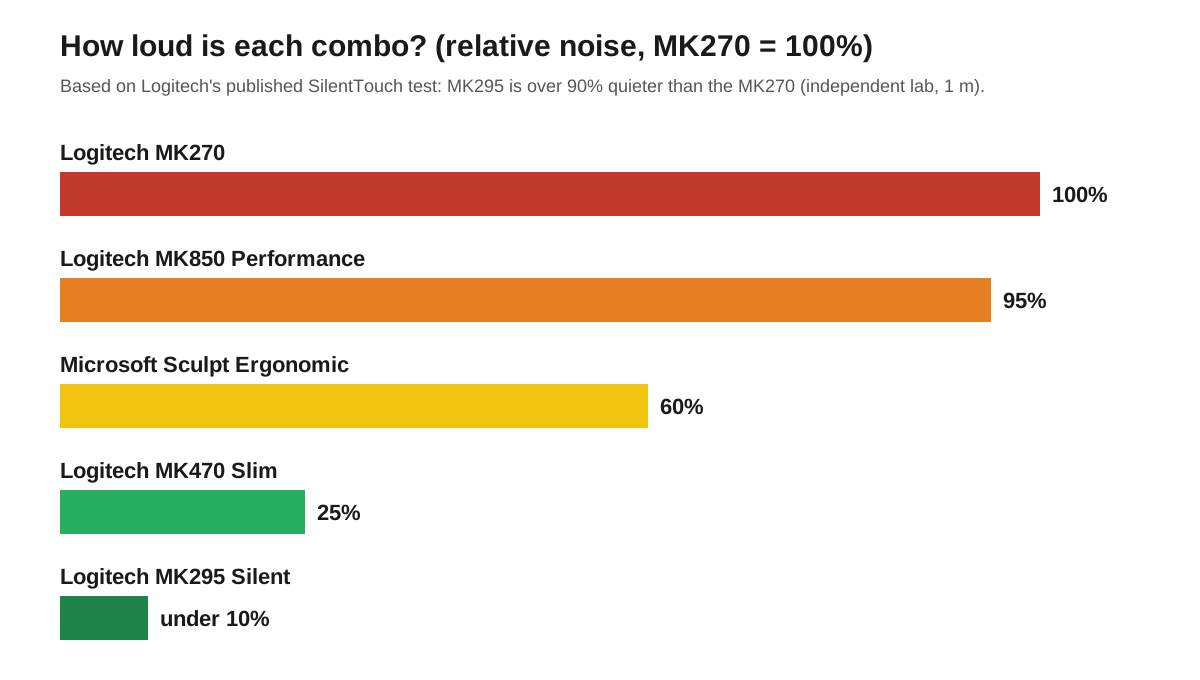
Logitech’s 90% figure comes from an independent lab that measured click and typing noise at 1 meter, comparing the MK295 directly against the MK270. A 90% reduction is dramatic: the click your call participants hear as a sharp tap becomes a soft thud.
The chart below puts the five combos on one relative scale, using the MK270 as the baseline. The MK295 and MK470 sit far below it, the Sculpt sits in the middle, and the MK850 sits near the baseline — it was designed for comfort and multi-device use, not silence.
The practical rule is simple. If your microphone is on for most of the working day, buy a silent combo. A good headset helps — our best headset for working from home guide covers noise-canceling options — but it only filters what the microphone hears. Fixing the noise at the keyboard is the only fix that works for everyone on the call.
How much should you spend on a keyboard and mouse combo?
For most office workers, $30–$35 is the right budget — it buys the MK295 Silent at its normal price. Below that, the MK270 at $20 is the only combo worth buying — anything cheaper tends to have mushy keys and a laggy mouse. Above $35, you pay for a specific feature: the MK470’s size at $34, the MK850’s switching at $80, or the Sculpt’s ergonomics at about $70.
If you’re not in a hurry, Black Friday week (Nov 27–30) is when keyboard and mouse combos hit their yearly floor — our Black Friday keyboard and mouse deals guide tracks the discount bands to expect.
How do you set up a combo for a comfortable workday?
A combo only helps if it sits at the right height. Your elbows should rest at roughly 90 degrees with your hands on the keys, and your wrists should stay straight. If your desk is too high for that, a keyboard tray drops the keyboard by several inches — the cheapest ergonomic upgrade after the combo itself.
Two habits beat any accessory. Keep the mouse close to the keyboard, not pushed out to the side, so your shoulder stays relaxed. And add a wrist rest if your keyboard has no palm rest — the MK270, MK295, and MK470 all ship without one.
Frequently asked questions
Is a wireless keyboard and mouse combo better than buying them separately?
Yes, for office work a combo is better than buying the keyboard and mouse separately. A combo costs less than the two parts bought alone, uses a single USB receiver instead of two, and guarantees the pair matches in size, style, and battery type.
How long does a wireless keyboard and mouse combo last?
A good wireless keyboard and mouse combo lasts three to five years of daily office use. The batteries last 12 to 36 months per set, the keys are rated for millions of presses, and people usually replace a combo for a new computer or desk, not because it failed.
Can I use a wireless keyboard and mouse combo with a laptop?
Yes, any wireless keyboard and mouse combo with a USB receiver works with a laptop. Plug the receiver into a free USB port — or a USB hub if your laptop only has USB-C — and it works immediately, no software needed.
Do wireless keyboard and mouse combos work with Mac?
Yes, the Logitech MK850 works fully with Mac, and the other Logitech combos cover basic typing and pointing, though their Windows shortcut keys do nothing on macOS. The Microsoft Sculpt works on Mac too, but it is designed for Windows.
The bottom line
Start with the noise question — it is the one you will notice every single day. If you spend your day on video calls or share an office, buy the Logitech MK295 Silent at about $35 and never think about keyboard noise again. If you work alone and want the cheapest reliable desk, the Logitech MK270 at $20 is the best value in office gear. Small desk, pick the MK470. Multiple computers, pick the MK850. Aching wrists, pick the Sculpt. Any of the five will outlast the laptop you plug it into.