

You can prevent most typing-related wrist pain by keeping your wrists straight and level with your forearms, setting your keyboard at or just below elbow height, and taking a short stretch break every 20 to 30 minutes. Pain that includes numbness, tingling, or night waking needs a doctor, not a new keyboard.
As an Amazon Associate I earn from qualifying purchases.
How to Prevent Wrist Pain from Typing (Ergonomist-Backed Guide)
The quotable rule: your wrists should float straight, like an extension of your forearms — if they bend up, down, or sideways while you type, your setup is asking for pain.
Typing itself is not the enemy. The problem is the position your wrists spend eight hours in: bent back over a keyboard that sits too high, resting on a hard desk edge, with no breaks. Fix the position, fix the height, and add movement, and most typing wrist pain fades within a few weeks. We compared specs, prices, and verified owner reviews for the gear mentioned here; nothing in this guide comes from hands-on lab testing.
What causes wrist pain from typing?
Typing-related wrist pain usually comes from one of three problems: sustained wrist extension (wrists bent upward), pressure on the underside of the wrist, or thousands of small repetitive motions with no recovery time. The carpal tunnel — the narrow passage in your wrist that carries the median nerve and nine tendons — is the structure most often involved. When the wrist bends or the tunnel is compressed, pressure on the median nerve rises, and that is what produces aching, tingling, and numbness.
Cleveland Clinic explains that carpal tunnel syndrome causes numbness, tingling, and pain in the wrist, hand, and fingers, and that symptoms often start at night before spreading into the workday, especially when the same motion is repeated at work. Proper technique and posture while typing, plus stretching, can reduce the risk.
Two other conditions commonly get blamed on typing. Tendinitis (inflammation of the wrist tendons) feels like a dull ache on the thumb side of the wrist and worsens with gripping or lifting. Both respond to the same fixes — neutral wrist, lower keyboard, more breaks — but only a clinician can tell them apart from carpal tunnel. If your pain comes with numbness or tingling in the thumb and first three fingers, or it wakes you at night, skip the gear shopping and book a doctor’s appointment first.
How should your wrists sit when you type?
Your wrist should be straight — in line with your forearm, not bent up, down, or sideways. Ergonomists call this the neutral wrist position, and it is the single most important idea in this guide. A neutral wrist keeps the carpal tunnel at its widest, which keeps pressure on the median nerve at its lowest.
Cornell University’s ergonomics guidance recommends keeping wrists in a neutral, straight position while typing, with the keyboard at or slightly below elbow height. The U.S. Occupational Safety and Health Administration (OSHA) gives the same advice: wrists straight, forearms roughly parallel to the floor, and no resting the wrists on a hard edge while typing.
Three habits break the neutral position most often:
- Resting your palms on the desk while you type. Your wrists bend back to reach the keys, and the desk edge presses into the underside of the wrist — exactly where the carpal tunnel sits. Rest your palms only when you pause.
- Keyboard feet flipped up. Raising the back of the keyboard tilts it toward you and forces your wrists into extension. Keep the feet down so the keyboard lies flat or slopes gently away from you.
- A keyboard that is too far away. Reaching forward pulls your shoulders up and bends your wrists. The keyboard should sit close enough that your elbows stay near your sides.
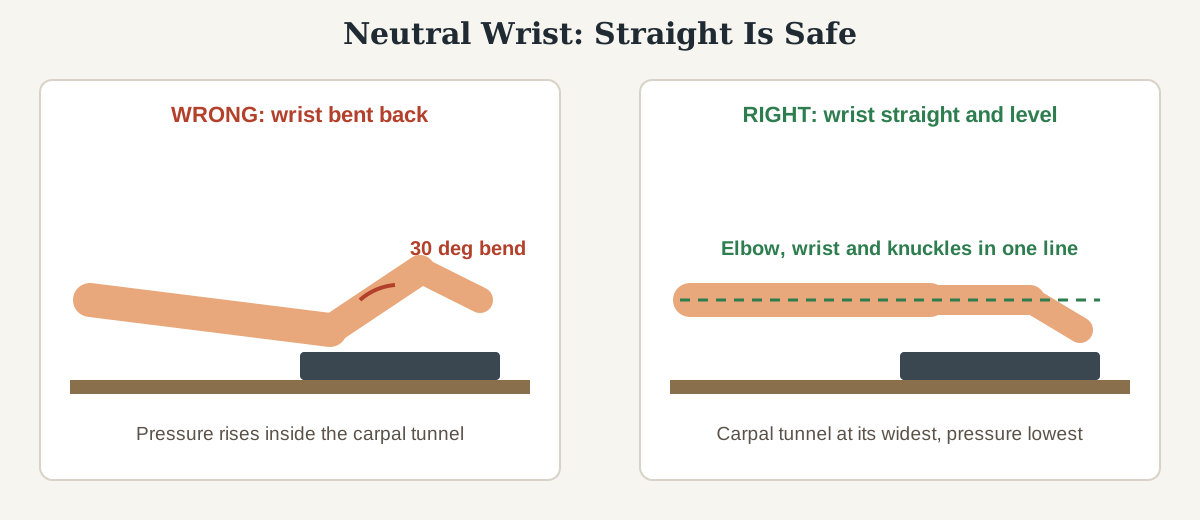
A quick self-check: hold your hands out as if typing, then look at them from the side. If you can draw a straight line from your elbow through your wrist to your knuckles, you are neutral. If your wrist kinks upward at the desk edge, lower the keyboard or raise your chair until the line straightens.
How do you set up your desk to protect your wrists?
Wrist position is set by desk geometry, not willpower. Get four measurements right and the neutral wrist mostly takes care of itself.
1. Chair height first. Sit with your feet flat on the floor and your thighs roughly parallel to it. Your elbows should rest at about 90 degrees, with your forearms level. If your chair is too low, you reach up to the keyboard and your wrists bend back; too high, and your shoulders hunch.
2. Keyboard at or just below elbow height. With your chair set, your keyboard surface should sit at elbow level or up to an inch below it. On a standard 29-inch desk this is impossible for most people without a keyboard tray, because the desk surface sits above elbow height for anyone under about 5 feet 10 inches. A tray drops the keyboard 3 to 4 inches below the desk surface — often exactly the gap between a bent wrist and a straight one. Our best under-desk keyboard tray guide compares trays by drop depth, width, and tilt adjustment.
3. Mouse at the same height as the keyboard. A mouse parked on the desk while the keyboard sits in a tray forces your right arm up and your wrist sideways every time you switch. Keep the mouse on the same surface as the keyboard, close to your body. A compact keyboard without a number pad lets the mouse sit closer to your center line, which reduces sideways wrist bending.
4. Monitor at arm’s length, top edge at eye level. When the monitor is too low or too far away, you lean forward, your shoulders rise, and your wrists take the strain. OSHA’s workstation guidance puts the screen about an arm’s length away with the top of the screen at or slightly below eye level. Our standing desk setup guide covers the same measurements for sit-stand desks, where the keyboard height changes every time you switch positions.
What stretches actually help typing wrist pain?
Stretching works when it is frequent and gentle — a little, often, beats one long session at the end of the day. Do this 60-second routine every hour of typing.
- Prayer stretch: press your palms together in front of your chest, fingers pointing up, and lower your hands slowly until you feel a mild stretch in the inner wrists. Hold 15 to 20 seconds.
- Reverse prayer: press the backs of your hands together, fingers pointing down, and lift gently until the tops of your wrists stretch. Hold 15 to 20 seconds.
- Wrist circles: make slow circles with each wrist, 10 in each direction, keeping the motion smooth and pain-free.
- Finger spreads: spread your fingers wide, hold 5 seconds, then make a fist and hold 5 seconds. Repeat 5 times.
- Forearm flexor stretch: extend one arm forward, palm up, and gently pull the fingers back toward you with the other hand until the underside of the forearm stretches. Hold 15 to 20 seconds per arm.
Cleveland Clinic’s carpal tunnel guidance recommends stretching the wrists and hands before and after intense activity, adjusting chair height and keyboard position, and changing hand and wrist positions — and it adds that home measures that do not ease pain within one to two weeks deserve an orthopedic evaluation.
How often should you take breaks from typing?
A practical schedule for a typing-heavy day:
- Every 20 to 30 minutes: drop your hands to your lap for 20 to 30 seconds, shake them out, and do one stretch from the routine above.
- Every hour: stand up for 2 minutes and do the full 60-second stretch routine.
- Every 2 hours: take a genuine 10-minute break away from the keyboard — not scrolling on your phone, which is the same repetitive motion in a smaller package.
If you use a standing desk, alternate sitting and standing through the day, but do not stand all day: standing changes your elbow height relative to the keyboard, so re-check your wrist position each time you switch. A timer app or a smartwatch stand reminder makes this automatic; willpower alone rarely does. Cornell’s ergonomics program popularized the 20-8-2 rule — sit for 20 minutes, stand for 8, move for 2 — and the same rhythm works for wrists, because standing and moving also unloads your hands.
Do wrist rests and ergonomic keyboards actually help?
They help, but only when they fix a real problem in your setup. A wrist rest does not prevent wrist pain by itself — it fills the gap between your palms and the keyboard so your wrists stay straight while you pause. Used wrong, a wrist rest makes things worse: resting your wrists on it while typing bends them back and presses the carpal tunnel into the rest. Palms on the rest when you pause; wrists floating while you type.
| Option | What it fixes | Best for | Price (as of November 2026) |
|---|---|---|---|
| Gel wrist rest | Hard desk edge pressing into the wrist | Standard keyboards, 10–20 mm front height | About $19–$32 |
| Split ergonomic keyboard | Wrists bent sideways | Long typing days, wide shoulders | About $120–$150 |
| Keyboard tray | Keyboard too high for elbow height | Standard 29-inch desks | About $40–$90 |
| Vertical mouse | Wrist twisted flat | Mouse-heavy work | About $25–$100 |
| Compact keyboard (no number pad) | Mouse too far to the right | Right-hand mouse users | About $50–$130 |
Two products we compared that are worth naming: the Logitech ERGO K860 split ergonomic keyboard, whose curved layout and pillowed wrist rest are designed to reduce wrist bending — about $119.99 on sale against a $149.99 list price as of October 2026 — and the Kensington ErgoSoft wrist rest for slim keyboards, a gel rest for low-profile keyboards at about $19.29 as of October 2026. Both are solid defaults, but neither replaces the setup fixes above: a $150 keyboard on a 29-inch desk with the feet flipped up still bends your wrists. For a full comparison, see our best wrist rest for keyboard and mouse guide and our best ergonomic keyboard for office work roundup.
When should you see a doctor about wrist pain?
Most typing wrist pain improves within two weeks of fixing position, height, and breaks. See a doctor promptly if you notice any of these:
- Numbness or tingling in the thumb, index, or middle fingers that does not fade after a break
- Pain or tingling that wakes you at night
- Weakness — dropping objects, trouble opening jars, or a weaker grip than usual
- Pain that has lasted more than two weeks despite setup changes and stretching
- Swelling, redness, or warmth in the wrist, or pain after a fall or injury
Cleveland Clinic advises visiting a healthcare provider as soon as you notice carpal tunnel symptoms, because untreated nerve compression can cause permanent damage. A doctor can confirm the cause with a physical exam and, if needed, a nerve conduction study. This guide is not medical advice; it is ergonomics. If your symptoms match the list above, the next step is a clinician, not a shopping cart.
FAQ
Can typing actually cause carpal tunnel syndrome?
Typing alone rarely causes carpal tunnel syndrome, but typing for hours with bent wrists and no breaks can contribute to it. Cleveland Clinic lists repetitive hand motions at work among the risk factors, and notes that symptoms often start at night and worsen during repetitive daytime tasks.
How long does it take for typing wrist pain to go away?
Most setup-related wrist pain improves noticeably within two weeks of fixing wrist position, keyboard height, and break habits. If pain has not improved after two weeks, see a doctor, as Cleveland Clinic recommends for carpal tunnel symptoms that do not ease with home measures.
Should I wear a wrist brace while typing?
A wrist brace can help at night, when it holds the wrist neutral while you sleep. During the day it is a short-term aid, not a fix — it restricts movement and can weaken the wrist if worn constantly. Fix the setup first, and use a brace for sleep if a clinician recommends it.
Is a wrist rest good or bad for your wrists?
A wrist rest is good when used as a palm rest during pauses, because it removes pressure from the hard desk edge. It is bad when you rest your wrists on it while typing, because that bends the wrists back and presses the carpal tunnel into the rest. Float your wrists while typing; rest your palms when you pause.
What is the best keyboard height to prevent wrist pain?
The keyboard should sit at or just below elbow height, with your forearms roughly level and your wrists straight. On a standard 29-inch desk that usually means a keyboard tray, since the desk surface sits above elbow height for most people. OSHA and Cornell both give the same elbow-height rule.
The bottom line
Wrist pain from typing is almost always a position problem with a position solution: straight wrists, keyboard at elbow height, and a stretch break every 20 to 30 minutes. Start with the free fixes — chair height, keyboard feet down, palms off the desk while typing — and add gear only for the problem that remains. If numbness, tingling, or night waking shows up, or nothing improves in two weeks, see a doctor.