Best Monitor Privacy Screens (2026): 4 Filters That Actually Keep Your Work Private
The best monitor privacy screen for most home-office setups in 2026 is the Amazon Basics Privacy Screen Filter 24″ 16:9 (about $31): it blackouts the screen past 30 degrees on either side, ships with both adhesive and slide-mount options, and costs a fraction of premium brands. If you want tool-free removal, step up to the magnetic Kensington MagPro 24″.
See our monitor desk setup guide for the full setup walkthrough.
As an Amazon Associate I earn from qualifying purchases.
TL;DR: our verdict
- Best overall value: Amazon Basics Privacy Screen Filter 24″ 16:9 — roughly $31 as of October 2026, reversible matte/glossy, dual mounting.
- Best magnetic mount: Kensington MagPro 24″ (K55418WW) — tool-free snap on/off for slim-bezel displays, around $110-120.
- Best for 27-inch setups: SightPro 27″ 16:9 2-pack — two filters, ideal for covering a dual-monitor pair.
- Best budget small-monitor pick: APeiSi 18.5″ — under $20, a cheap fix for a secondary or older display.
Every filter on this list narrows visibility to a 60-degree total cone, the industry standard set by 3M’s microlouver technology: anyone sitting more than about 30 degrees off-center sees a black screen instead of your work.
Quick comparison
| Pick | Best for | Price* | Sizes | Mount type |
|---|---|---|---|---|
| Amazon Basics Privacy Screen Filter | Most 24″ 16:9 home-office monitors | ~$31 | 14″ to 24″ range | Adhesive strips or slide-mount tabs |
| Kensington MagPro 24″ (K55418WW) | Shared desks and quick on/off use | ~$110-120 | 24″ 16:9 (other sizes available) | Magnetic strip |
| SightPro 27″ 16:9 2-pack | 27″ monitors and dual-display setups | ~$45-60 | 27″ 16:9 (other sizes available) | Adhesive strips or slide-mount tabs |
| APeiSi 18.5″ Privacy Screen Filter | Older and smaller secondary monitors | Under $20 | 18.5″ 16:9 (other sizes available) | Adhesive strips or plastic tabs |
*Prices as of October 2026.
How does a privacy screen work?
A privacy screen is a thin filter that sits on your display and uses micro-louver technology — thousands of microscopic vertical blinds laminated into the film. Straight-on light passes through, so the image looks normal to you. Light traveling at a steeper angle gets blocked, so the screen fades to black for anyone sitting off to the side.
The number that matters is the privacy cone: almost every quality filter, including all four below, darkens the screen beyond 30 degrees on each side of center, for a 60-degree total viewing zone. That is the standard 3M established and competitors match. Anything narrower than 60 degrees will feel tunnel-like; anything wider leaks to neighbors.

One honest limit: privacy filters protect against side views, not someone standing directly behind you. No louver film can do that — it is physics, not a product flaw. Pair your filter with sensible desk placement (back to a wall, not facing the door) for full protection.
How do I pick the right size?
Getting the size right matters more than the brand. Follow these three steps:
- Measure the viewable area only. Use a tape measure on the lit part of the screen — inside the bezel, not including the frame. A 24-inch 16:9 monitor has a viewable area of about 20.94 x 11.79 inches, not 24 x anything. The diagonal alone tells you nothing useful for fit.
- Match the aspect ratio. Most office monitors are 16:9, many are 16:10, and laptop-style 3:2 panels are creeping in. A 16:10 filter on a 16:9 screen will not cover it correctly, and a 16:9 filter on a 16:10 screen leaves gaps at the top and bottom where text stays visible.
- Check the filter orientation. Privacy louvers run vertically in landscape orientation, which gives you left-right privacy. Rotating the same filter to portrait usually means the privacy direction rotates too — fine for portrait-coding setups, but confirm the manufacturer states portrait support if you work that way. All four picks below are landscape-first.
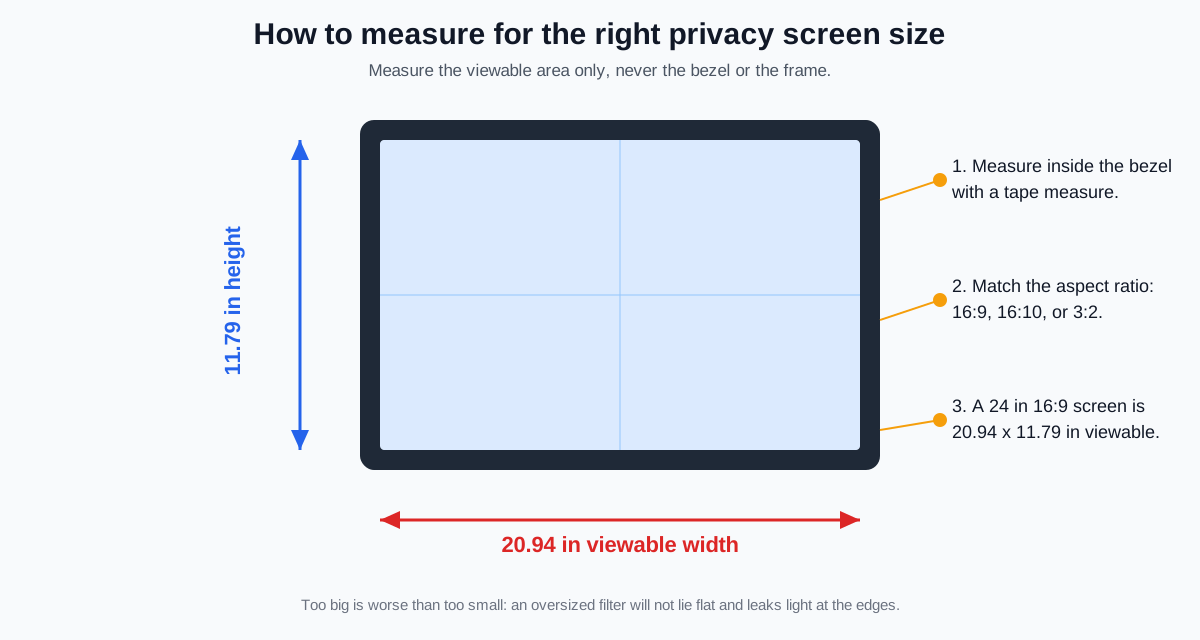
Too big is worse than slightly too small: an oversized filter will not lie flat, and light leaks at the curled edges defeat the whole point.
Best monitor privacy screens for 2026
1. Amazon Basics Privacy Screen Filter 24″ 16:9 — best overall value
At about $31, this is the filter that makes the premium options hard to justify for a typical home-office monitor. The 24″ 16:9 version measures 20.94 x 11.79 inches, exactly the viewable area of a standard 24-inch 1080p display, and it narrows the viewing angle to the standard 60-degree cone — anyone outside 30 degrees off-center sees black.
It ships with two mounting methods in the box: clear adhesive strips that attach the filter directly to the screen for a semi-permanent fit, and slide-mount tabs for raised-bezel monitors that let you slip the filter on and off. The filter is reversible — glossy side for maximum clarity, matte side for glare reduction — and it filters about 40% of blue light and 99% of UV, which doubles as eye-strain relief during long workdays.
The honest tradeoff: adhesive strips are effectively one-shot on glass displays, so think of this as a set-and-forget filter. If you demo work to colleagues over your shoulder regularly, the magnetic pick below is the better match.
Check the Amazon Basics Privacy Screen Filter on Amazon
2. Kensington MagPro 24″ (K55418WW) — best magnetic mount
The MagPro is the office-favorite answer to the privacy question: a slim magnetic strip along the top edge lets you snap the filter onto your monitor and pull it off in seconds, no adhesive involved. That makes it the natural pick for shared desks, hot-desking, or any setup where you sometimes want a colleague to see the screen.
The privacy specs match the standard: a limited viewing angle of +/- 30 degrees, blue light reduction up to 22%, and a reversible matte/glossy surface with a low-reflective coating for glare control. It is specifically designed for slim-bezel and edge-to-edge displays that other filters struggle to grip, and the kit includes a cleaning cloth and a protective case so the filter survives in a bag when removed.
Expect to pay roughly $110-120 on Amazon as of October 2026 — about four times the Amazon Basics filter for the magnetic convenience. The 2-year warranty and TAA compliance also make it the safe pick if you are buying for a workplace with procurement rules.
Check the Kensington MagPro 24″ Privacy Screen on Amazon
3. SightPro 27″ 16:9 2-pack — best for 27-inch and dual-monitor setups
Running a 27-inch monitor or a matched dual pair changes the math: you need either one large filter or two identical ones, and the SightPro 2-pack ships two 27″ 16:9 filters in one box. If you have dual monitors for work from home — and two-thirds of our dual-monitor setup guide readers do — buying the pair together keeps both screens matched in tint and brightness, which matters more than it sounds.
Each filter blacks out the screen from the side while staying clear head-on, cuts glare and blue light, and comes with the standard two attachment options: clear adhesive strips or slide-mount tabs. The filters are slim enough to sit inside a raised bezel without bowing, and the bundle typically lands around $45-60 for both as of October 2026, which works out cheaper per screen than buying two branded singles.
The caveat is mounting: there is no magnetic option here, so this is a semi-permanent install. Plan to commit, and measure both monitors — 27″ 16:9 only; a 27″ 16:10 panel needs a different filter.
Check the SightPro 27″ Privacy Screen 2-Pack on Amazon
4. APeiSi 18.5″ Privacy Screen Filter — best budget pick for small monitors
Not every desk needs a 24-inch privacy solution. If your second monitor is an older 18.5″ panel, or you want cheap protection for a kid’s school setup, the APeiSi 18.5″ typically costs under $20 and covers the standard privacy cone just fine.
The filter measures 410 x 231 mm (16 1/8″ x 9 1/16″) for a 16:9 display, uses the same multi-layer film approach — clear straight on, darkened from the side — and includes both adhesive strips and removable plastic tabs plus a cleaning cloth and a 1-year warranty. It is reversible matte/glossy like the others, so you are not giving up the features that matter, just the brand name and the premium packaging.
This is a commodity filter at a commodity price: check recent reviews before buying, and do not expect Kensington-level fit precision. For under twenty dollars, that is a fair trade.
Check the APeiSi 18.5″ Privacy Screen Filter on Amazon
Will a privacy screen hurt image quality?
Yes, a little — and knowing the tradeoffs keeps you from being disappointed. A privacy filter cuts 10-25% of peak brightness because the louvers physically block angled light, and matte sides soften contrast slightly. The fix is free: raise your monitor brightness 10-20% after installing the filter.
Three rules to keep image quality acceptable:
- Use the glossy side for color-critical work. The matte side reduces glare but also blurs fine detail; the glossy side preserves sharpness and color accuracy for photo editing and spreadsheets. This is also why a good glare-control setup pairs well with a filter rather than replacing it.
- Expect warmer whites. Blue light is part of what gets filtered, so whites shift slightly warm. Most people stop noticing within a day; designers who need color accuracy should calibrate with the filter on.
- Do not stack a filter over a raised screen protector. Two films trap dust between them and create moire patterns. Remove old protectors first.
If your monitor hangs on an arm, set the screen angle before mounting the filter — the 60-degree cone follows the screen, so tilting the monitor toward a neighbor defeats it.
FAQ
Will a privacy screen stop someone from reading my screen over video calls?
No. A privacy filter only narrows the physical viewing angle; it does nothing to what your webcam sees and shares. For calls, position your screen away from windows and use a background blur instead.
Can a privacy screen work on a curved monitor?
Not well. Flat louver film cannot follow a curve, so the edges lift and leak light. Privacy screens are designed for flat panels; if you have a curved ultrawide, the practical answer is desk placement against a wall.
Magnetic vs adhesive vs hanging mounts — which should I choose?
Magnetic mounts are best if you remove the filter often and your monitor has a steel bezel or works with magnetic strips. Adhesive strips are best for a permanent, flat fit on any screen. Slide-mount tabs and hanging filters are best for raised-bezel monitors where you want occasional removal without adhesive.
Does a privacy screen reduce blue light?
Yes, most filters reduce blue light by 22-40% depending on the brand, because the film absorbs part of the spectrum. It is a side benefit, not a medical-grade solution — keep using night mode and taking screen breaks.
Will a privacy filter fit my ultrawide or portrait monitor?
Standard filters are cut for common 16:9 and 16:10 sizes up to 34 inches, and several brands sell portrait-orientation versions. Measure your viewable area and aspect ratio first; ultrawides above 34 inches may need a custom-cut filter.
The bottom line
A monitor privacy screen is one of the cheapest security upgrades a home office can buy: for about $31, the Amazon Basics 24″ filter gives you the same 60-degree blackout cone as filters costing four times more. Measure your viewable area, match the aspect ratio, pick magnetic if you share the screen often — and stop worrying about the coffee-shop table next to you.