Best Mini Desk Vacuums for Keyboards & Desktops (2026)
The best mini desk vacuum for keyboards in 2026 is the Brigii Y120 Pro 3-in-1 (around $40 as of October 2026): it pairs the strongest suction in its class with a blower mode that clears dust from under keycaps, and it runs on a rechargeable battery. Budget shoppers should grab the ODISTAR Desktop Vacuum (under $15) — a simpler AA-powered sweeper that still handles crumbs and hair with zero fuss.
As an Amazon Associate I earn from qualifying purchases.
TL;DR — our verdicts: Best overall: Brigii Y120 Pro 3-in-1 (~$40) for suction + blower versatility. Best classic value: ODISTAR Desktop Vacuum (under $15) for cheap daily dusting. Best for shared offices: a quiet cube-style unit (~35 dB) for calls and meetings. Best rechargeable classic: ODISTAR with Wireless Charger (mid-teens). Any of these beats canned air — a reusable mini vacuum pays for itself within a year.
What makes a mini desk vacuum good for keyboards?
Suction placement beats raw suction numbers. The mess on a keyboard lives in the narrow gaps between keycaps, so a mini desk vacuum earns its keep with a slim nozzle or crevice tool that can reach into those gaps — not with a claimed “KPa” figure that has no standard behind it. The best mini desk vacuum for a keyboard is the one you will actually grab: light enough for one hand, always charged, and simple enough to empty in seconds.
Five things matter, in this order:
- Nozzle shape. A flat crevice nozzle or brush tool reaches between keys. Wide round mouths just blow crumbs around.
- Power source. Rechargeable (USB/USB-C) units cost more but are always ready; AA-battery units are cheaper and never tether you to a charger.
- Dustbin access. Twist-off bins you can empty over a trash can in five seconds win. Tiny screw-off caps get annoying by week two.
- Noise. Anything under ~60 dB is tolerable in a home office; under ~40 dB works during video calls.
- Blower mode (bonus). Some units reverse airflow to blow dust out of keyboards — useful for mechanical keyboards you don’t want to disassemble.
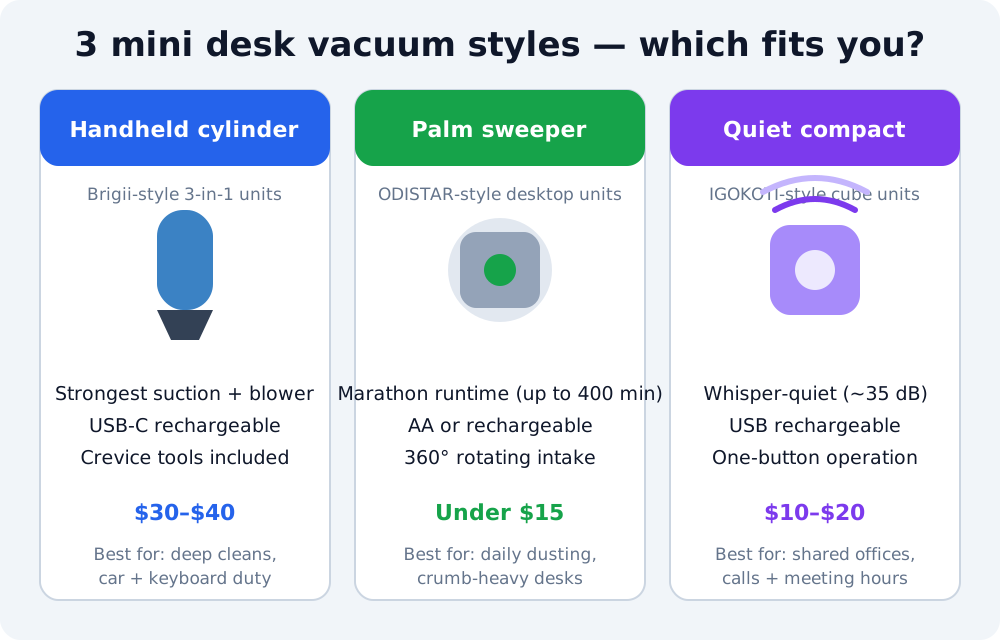
| Pick | Price (as of Oct 2026) | Power source | Runtime | Noise | Best for |
|---|---|---|---|---|---|
| Brigii Y120 Pro 3-in-1 | ~$40 | 2500mAh rechargeable | Long per charge (3–4 hr full charge) | Moderate | Deep cleans, keyboard + car duty |
| Brigii Mini Vacuum + Blower (Y120) | ~$35–$38 | Rechargeable | Up to ~20 min per charge | Moderate | Keyboards + blowing dust off electronics |
| ODISTAR Desktop Vacuum (AA) | ~$10–$16 | 2× AA batteries | Up to 90 min (claimed) | Low | Daily dusting, cheapest entry |
| ODISTAR with Wireless Charger | ~$10–$16 | 1600mAh rechargeable | Up to 400 min (claimed) | Low | Rechargeable take on the classic |
Price note: mini desk vacuums fluctuate a lot on Amazon — the ODISTAR classic has bounced between $10 and $16 for years depending on color. Buy when it’s at the low end of its band.
Which mini desk vacuum is the best overall?
The Brigii Y120 Pro earns the top spot because it is the only pick that is genuinely three tools in one: vacuum, air duster, and hand pump. At around $40 as of October 2026 (price history shows it ranging roughly $33–$62 since 2020), it costs more than the classic palm sweepers — and justifies it.
The Y120 Pro’s 80W motor delivers over 4KPa of cyclone suction per the listing specs, which puts it a class above the AA-powered sweepers. It ships with four crevice tools (mini brush, flat nozzle, hose, and blow nozzle), so it reaches between keycaps, inside drawers, and along car seat seams. The blow mode is the sleeper feature: attach the nozzle to the exhaust end and it blasts dust out of a keyboard without pulling keycaps off — handy for mechanical keyboards where vacuuming alone leaves the under-key dust untouched.
The 2500mAh lithium battery needs 3–4 hours for a full charge and is rated for roughly 500 charge cycles. At 8.5 inches long and about 1 lb (454g), it is bigger than a palm sweeper but still fits in a desk drawer or cup holder.
The one real weakness: the dustbin is small, so heavy crumb duty means frequent emptying. Treat it as a spot-cleaning tool, not a floor vacuum, and you will not be disappointed. Buyers consistently rate Brigii’s handheld line highly — the sibling Y120 model holds a 4.1-star average across 5,300+ Amazon reviews.
Buy it if: you want one gadget that cleans your keyboard, desk, drawers, and car — and you prefer rechargeable over buying AA batteries. Check the current price on Amazon.
Is the Brigii Mini Vacuum (Y120) still worth buying?
Yes — if you can find it under $35. The Brigii Mini Vacuum + Blower (Y120) is the slightly older sibling of the Y120 Pro: a 2-in-1 dust-buster-and-blower that covers the core job (keyboard + desktop cleanup) for a few dollars less. Merchant data shows recent pricing around $37.99 as of October 2026.
It shares the family strengths: USB-rechargeable, cordless, a washable filter that keeps running costs at zero, and a blow mode for blasting dust out of electronics. Runtime runs up to about 20 minutes per charge — plenty for a desk cleanup routine.
The trade-offs versus the Y120 Pro: fewer attachments (no flexible hose), a smaller battery, and an older USB port design. If the price gap is under $5, get the Pro. If you spot the Y120 at a clear discount, it is the better value.
Buy it if: you want Brigii build quality at the lowest entry price in the lineup. See it on Amazon.
What is the best budget mini desk vacuum?
The ODISTAR Desktop Vacuum Cleaner is the original viral mini desk vacuum — the one that racked up 8,700+ five-star Amazon reviews and countless TikTok clips — and it still sells for roughly $10–$16 as of October 2026 depending on color. Nothing else gets you this close to disposable pricing for a tool you’ll use weekly.
The design is deliberately simple: a palm-sized puck with a 360° rotating intake, powered by two AA batteries (not included). The headline claim is up to 90 minutes of endurance on the AA version, with a disk filter and a 200ml dustbin you clear with the included brush. Third-party testing puts its suction around 1000pa — modest on paper, but reviewers consistently report it handles crumbs, eraser shavings, hair, and fine dust on hard surfaces without drama.
Keep expectations calibrated. This is a surface sweeper, not a deep cleaner: it will not pull packed dust from deep between keycaps the way a crevice nozzle can, and it runs on disposable batteries unless you use rechargeables. But for the classic use case — a quick pass over the desk and keyboard after lunch — it is the best value in the category by a wide margin.
Buy it if: you want the cheapest way to stop crumbs accumulating on your desk, or you are buying one as a gift. See it on Amazon.
Do rechargeable mini desk vacuums last long enough?
The ODISTAR Desk Vacuum with Wireless Charger answers the main complaint about the AA classic: it swaps the batteries for a built-in 1600mAh lithium cell, charged over USB in about 2–3 hours, and claims up to 400 minutes of continuous cleaning. It typically lands in the same $10–$16 band as the AA version as of October 2026, which makes it the smarter buy if you hate hunting for batteries.
Everything else carries over: the 360° rotatable intake, the compact handheld form, the 12-month warranty, and the low-noise profile that makes it office-friendly. The wireless-charger naming is a bit of marketing gloss — it charges over USB from a car charger, adapter, power bank, or laptop port — but the practical point stands: this is the no-batteries version of the best-selling classic.
The honest caveat: “400 minutes” is the listing’s endurance claim under ideal conditions; real-world runtime with actual debris will be shorter. For a desk-cleaning routine of a few minutes a day, one charge still lasts weeks.
Buy it if: you like the ODISTAR classic but want USB recharging instead of AA batteries. See it on Amazon.
How do you clean a mechanical keyboard with a mini vacuum?
A mini vacuum is the fastest way to maintain a keyboard between deep cleans — but technique matters, especially on mechanical boards where keycaps can pop off. Follow this routine every week or two:
- Unplug or power off the keyboard. Vacuuming a live board can trigger random keypresses.
- Tilt the keyboard upside down and shake gently over a trash can to drop loose debris first. The vacuum handles what shaking misses.
- Use the flat crevice nozzle, not the wide mouth. Glide it between key rows with light pressure — pressing hard can pull keycaps off mechanical switches.
- Finish with the blower (if your unit has one). Blow mode clears the fine dust that settles under keycaps where suction can’t reach.
- Empty the bin immediately. Keyboard debris (hair, skin cells, crumbs) compacts fast; a full bin kills suction on the next pass.
Pair this routine with good desk habits: a keyboard cover when you are not typing, and no eating directly over the board, cuts the debris load in half. If you are shopping for a quieter typing experience while you are at it, our quiet mechanical keyboard guide covers boards that won’t drive your coworkers mad. And if clutter is the bigger problem, the right desk organizer keeps crumbs from hiding in the first place.
When is the cheapest time to buy desk gadgets?
Mini desk vacuums are impulse-price gadgets: they rarely get big standalone discounts, but they ride the site-wide coupon waves. The pattern from price-history data is consistent — the Y120 Pro has swung between roughly $33 and $62, and the ODISTAR classic between $10 and $16 — so buying at the bottom of the band saves 30–40%.
If you are not in a hurry, Black Friday week (Nov 27–30) is when these prices dip: small accessories get stacked coupon codes rather than headline deals, so a $40 handheld often drops to the low $30s. Our Black Friday desk accessory deals guide tracks the discount bands to expect across desks, chairs, and accessories. For a broader look at small upgrades that make a desk feel better, see our desk accessories guide — and our roundup of desk accessories that actually boost productivity if you want the full shortlist.
Mini desk vacuum FAQ
Will a mini desk vacuum damage my keyboard? No, as long as you use the crevice nozzle with light pressure — aggressive suction on a wide nozzle can lift keycaps on mechanical keyboards, so glide, don’t press.
Are mini desk vacuums actually worth it? Yes for crumb-heavy desks: they cost $10–$40, replace recurring canned-air purchases, and take under a minute per cleanup.
How often should you vacuum your keyboard? Every 1–2 weeks for typical use, or daily if you eat at your desk — crumbs compact between keys and get harder to remove over time.
Can you use a mini desk vacuum on a laptop screen? No — keep suction away from screens; use a microfiber cloth for the display and reserve the vacuum for the keyboard deck and desk surface.
Rechargeable or AA batteries? Rechargeable wins for daily use since it’s always ready; AA models are cheaper upfront and better as occasional-use or gift purchases.
Pingback: Desk Accessories Guide: Build a Smarter Home Office Desk (2026)