
Judge a standing desk’s stability by its leg design, frame, and weight rating — not its marketing copy. A stable desk has three-stage legs, a crossbar, feet at least 26 inches deep, and a weight rating at least double your real load. Test it at full standing height: a desk solid at 30 inches can wobble badly at 45.
How to Judge a Standing Desk’s Stability Before You Buy (2026)
A wobbly desk is the most common regret in this category: fine the first week, then the sway showed up once a monitor arm and a second screen were added, or at full standing height. Stability is predictable, though — a handful of mechanical facts you can check from a spec sheet, a product photo, or a five-minute showroom test. This guide is a spec checklist, not a ranking: we compared specs, prices, and owner feedback across the best-known electric desks, as of November 2026.
What actually makes a standing desk wobble?
A standing desk wobbles when the legs flex sideways or front-to-back under load, and the effect grows with height. Think of each leg as a lever: at sitting height (around 29 inches) the leg is short and stiff, so even a mediocre frame feels solid. At standing height (42–48 inches) the leg is extended, leverage on every joint multiplies, and any play in the telescoping sections shows as visible sway.
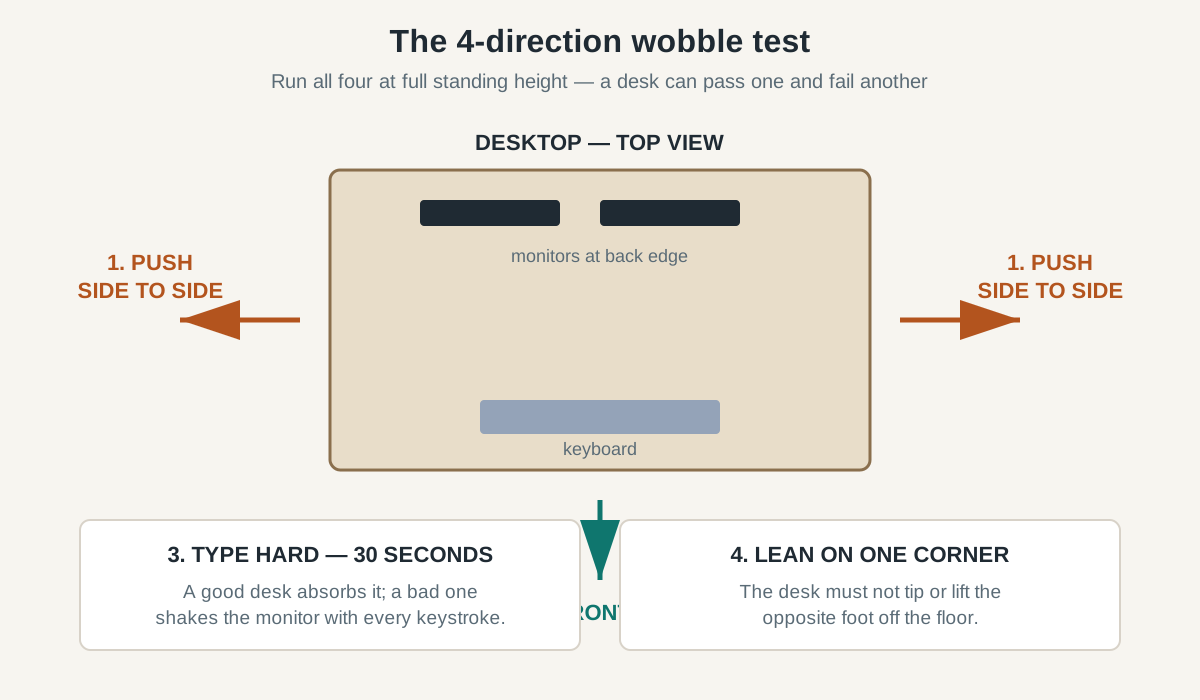
Two kinds of movement matter. Lateral wobble is the side-to-side sway you feel when you type hard or lean on the desk. Front-to-back wobble is the rocking toward and away from you, usually worst when a heavy monitor sits near the back edge. A good desk resists both; a weak one may feel fine in one direction and shaky in the other — so test in both directions, never just one.
How many leg stages do you need — two or three?
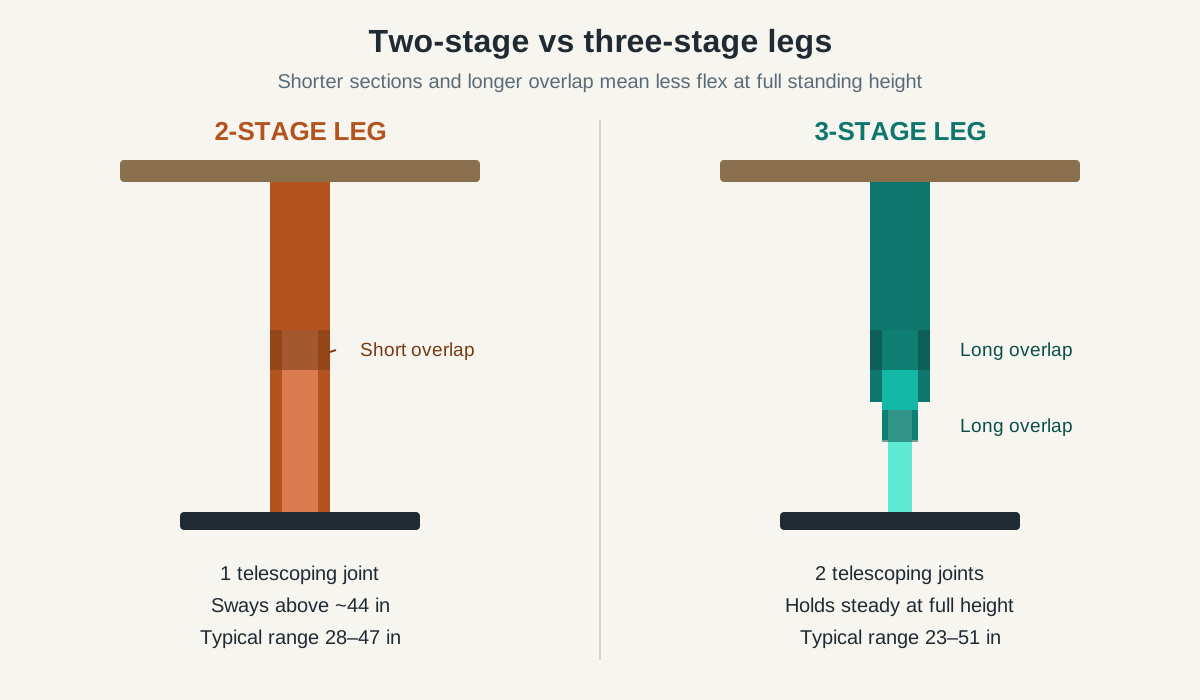
Leg stages are the single biggest predictor of stability at standing height. Each leg is made of telescoping sections: two in a two-stage leg, three in a three-stage leg. More stages mean shorter sections, longer overlap, and a leg that stays stiffer when fully extended — plus a wider height range.
| Feature | Two-stage legs | Three-stage legs |
|---|---|---|
| Height range | Usually 28–47 inches | Usually 23–51 inches |
| Stability at full height | Noticeable sway above ~44 inches | Holds steady at full extension |
| Lowest sitting height | ~28 inches — too high for shorter users | ~23–25 inches — fits most chairs |
| Typical price | $150–$300 | $300–$650+ |
| Best for | Shorter users, light loads, sitting mostly | Tall users, heavy setups, standing often |
The rule is simple: if you are over 5’10”, stand for more than two hours a day, or plan to mount two monitors, buy three-stage legs. Two-stage desks are fine for lighter use, but they are the most common source of wobble complaints — every premium desk here (UPLIFT V2, FlexiSpot E7, Fully Jarvis) uses three-stage legs.
What should the frame and feet look like?
The legs are only half the story. The frame connecting them decides whether the desk behaves as one rigid structure or two legs flexing independently. Look for a crossbar — a horizontal steel bar connecting the two legs under the desktop — which dramatically reduces lateral sway. Some premium frames use a wide mounting plate or reinforced side brackets instead. Either design works, but a frame with neither is a red flag: two bare legs bolted to the desktop with nothing between them means sway.
Feet matter just as much: look for feet at least 26 inches deep (front to back) — 28 inches is better. Short feet are a classic budget-desk shortcut and show up immediately as front-to-back rocking. Check the levelling glides too: they compensate for an uneven floor, a common hidden cause of rocking.
How much weight capacity do you really need?
Manufacturers advertise generous weight ratings, but the number that matters is your real load. Ratings are usually measured with weight centered and the desk stationary; your real load is off-center (monitors at the back edge) and dynamic (you lean on it, type on it). A practical rule: keep your total load under half the advertised rating — that leaves headroom for the motor, off-center weight, and years of daily up-and-down cycles.
| Your setup | Real load (approx.) | Minimum rating to look for |
|---|---|---|
| Laptop + one monitor | 35–50 lbs | 150 lbs |
| Two monitors on arms + desktop PC | 70–90 lbs | 200 lbs |
| Two monitors + PC + bookshelf items | 90–120 lbs | 250 lbs |
| Three monitors + heavy equipment | 120–160 lbs | 300 lbs+ |
Notice how quickly the numbers add up: a 27-inch monitor weighs about 10–14 pounds, a dual monitor arm adds 8–12, and a desktop PC is 20–30. That is why budget desks rated at 150–176 pounds — the typical ErGear and VIVO frames — are fine for a laptop setup but marginal once a dual-monitor arm enters the picture. The FlexiSpot E7 and UPLIFT V2, both rated at 355 pounds, handle a heavy multi-monitor setup with room to spare. For a closer look at what different budgets buy, see our best standing desks under $500. One more detail: dual motors beat single motors under load. A single motor drives one leg and transfers power to the other through a drive shaft, which can lift unevenly when the load is heavy on one side; dual-motor desks lift each leg independently and stay level.
Does desktop size and depth affect stability?
Yes — more than most buyers expect. A deeper desktop (30 inches instead of 24) lets you place monitors closer to the center of the frame, reducing the lever arm behind front-to-back rocking. A wider desktop (60 instead of 48 inches) spreads the load across both legs more evenly, and a thicker desktop (1 inch instead of 5/8 inch) resists flexing between the mounting points.
Our minimums: at least 48 inches wide and 24 inches deep for a single-monitor setup, 60 by 30 inches for a dual-monitor setup. A 24-inch-deep desktop with a monitor arm clamped to the back edge puts the screen’s center of gravity almost at the rear foot — the worst position for stability. If your room is tight, a small adjustable standing desk for apartments can still be stable, but check foot depth: compact desks often shrink the feet with the desktop, and that is where wobble comes from.
How can you test stability in a showroom?
If you can try a desk in person, five minutes tells you more than any spec sheet. Test at full standing height — the height you actually stand at — because that is where weakness shows.
- Push the front edge side to side. Place both hands on the front corners and push laterally. A stable desk barely moves; a wobbly one sways visibly and takes a second to settle.
- Push front to back. Push the desktop toward and away from you; if the screen would shake, the desk fails.
- Type hard for 30 seconds. Pound the keys the way you type in a hurry. A good desk absorbs it; a bad one transmits every keystroke to the monitor.
- Lean on one corner. Put your weight on a single front corner, as when standing up from a chair. The desk should not tip or lift the opposite foot off the floor.
- Raise it while loaded. If the showroom desk has monitors on it, run it from sitting to standing height and watch whether the screens stay level. A desk that racks (one side rising faster) has a weak lifting mechanism.
How do you test stability at home in the first 30 days?
Most standing desks are bought online, so your real test happens at home — and the return window is your safety net. Nearly every major brand offers a 30-day return policy, so use the first month to deliberately stress-test the desk. Load it exactly as you will use it (monitors mounted, PC in place), then run the same push and type tests at your full standing height — and at three heights (sitting, standing, maximum), because some desks are solid at two and shaky at the third.
Test it over time, not just on day one: run the desk up and down ten times a day for the first week, then re-check the wobble. Loose bolts are the most common cause of a desk that gets shakier over time — the bolts at the leg-to-foot and leg-to-frame joints settle after the first dozen cycles. Tighten every bolt after the first week, then again after the first month: five minutes that fixes a large share of reported wobble.
If it still wobbles, check the floor: uneven floors make any desk rock, so adjust the levelling glides until all four feet sit flat. Still failing? Return it — a desk that wobbles under your real load in the first 30 days will not get better.
What do owner reviews actually tell you about wobble?
Owner reviews are the best source of stability information, but only if you read them the right way. A product page with 4.5 stars and 2,000 reviews can still hide a wobble problem, because most reviewers write in the first week — before the weakness shows. Search reviews for “wobble,” “shaky,” “sway,” and “unstable,” and read the one- and two-star reviews first.
Then ask three questions about each complaint. At what height? A complaint at 48 inches from a 6’2″ user means the desk is weak at full extension; at 30 inches, the frame itself is bad. How heavy was the setup? A wobble report under a triple-monitor rig is expected on a budget frame; under a single laptop, it is damning. When did it appear? Wobble on day one points to a design problem; after six months, to loosened bolts or worn bushings. Compare the ratio, not just the count: ten wobble complaints among 3,000 reviews is noise; ten among 150 is a pattern.
Which desks pass the stability checklist?
Below are the best-known electric desks, with the specs that matter for stability, as of November 2026.
| Desk | Leg stages | Height range | Weight rating | Motors | Street price |
|---|---|---|---|---|---|
| UPLIFT V2 | 3-stage | 25.5–51.1 in | 355 lbs | Dual | From ~$549 |
| FlexiSpot E7 | 3-stage | 22.8–48.4 in | 355 lbs | Dual | ~$300–$350 |
| Fully Jarvis | 3-stage | 25.5–51 in | 350 lbs | Dual | From ~$549 |
| ErGear 55×28 | 2-stage | 28.3–46.5 in | 176 lbs | Single | ~$170–$200 |
| VIVO electric frame | 2-stage | 28.3–46.5 in | 176 lbs | Single | ~$180–$230 |
Three-stage, dual-motor desks cost more and carry more — the FlexiSpot E7 is the exception, bringing three-stage legs and a 355-pound rating to a mid-range price.
When is the best time to buy a standing desk?
Standing desks are among the most heavily discounted home-office products of the year: timing your purchase can save $100 or more on a mid-range frame, with the deepest discounts around Black Friday. If you’re not in a hurry, Black Friday week (Nov 27–30) is when standing desk prices hit their yearly floor — our Black Friday standing desk deals guide tracks the discount bands to expect.
That timing logic also applies to stability: a three-stage, dual-motor desk at a Black Friday price often costs the same as a two-stage desk at full price. Once you have chosen a desk, our standing desk setup guide covers monitor height, keyboard position, and the sit-stand routine that makes the desk worth owning. And if you are still deciding between a sit-stand desk and a fixed desk, the comparison in standing desk vs regular desk lays out the trade-offs.
Frequently asked questions
How do I know if a standing desk is stable before buying it?
Check three specs: three-stage legs, a crossbar or reinforced frame, and a weight rating at least double your real load. Then read owner reviews filtered for “wobble” and test at full standing height in the return window.
Is a 2-stage or 3-stage standing desk more stable?
A 3-stage desk is more stable, especially above 44 inches, because each leg section is shorter and overlaps more. Two-stage legs suit short users and light loads but sway noticeably at full standing height.
Why does my standing desk wobble at full height?
Usually two-stage legs flexing at maximum extension, a missing crossbar, or a load heavier than half the desk’s rated capacity. Tighten all bolts first, level the feet, and if it still sways, the frame is undersized for your height or load.
How much weight can a standing desk hold?
Most electric standing desks are rated for 150–355 pounds, but keep your real load under half the rating. A dual-monitor setup with a desktop PC typically weighs 70–90 pounds, so a 200-pound rating is the practical minimum.
The bottom line
A stable standing desk is a checklist, not a gamble. Three-stage legs, a crossbar or reinforced frame, feet at least 26 inches deep, a weight rating double your load, and dual motors — if a desk checks those five boxes, it will almost certainly feel solid at your standing height. Test it at full extension in the first 30 days, tighten the bolts after week one, and return it if it still sways.