Home Office Setup Guide (2026): The Small-Space Hub
A comfortable home office in a small space comes down to four decisions: put the desk in the brightest corner, buy the best chair your budget allows, raise the screen to eye level, and spend the most on whatever your body touches all day. This hub gathers our nine in-depth guides on layouts, budgets, and ergonomics into one starting point.
What Does a Complete Home Office Setup Actually Need?
Strip away the marketing: a home office needs five things — a stable surface, a supportive chair, a screen at eye level, eye-friendly light, and cables out of the way. Everything else is optimization.
- A desk or table that doesn’t wobble. Standard height (29–30 inches) suits most adults paired with an adjustable chair; stability matters more than features.
- A chair with adjustable height and real lumbar support. The single item most worth spending on — you sit in it 6–10 hours a day.
- A screen at eye level. A monitor, or a laptop on a stand with an external keyboard — screen top at or just below eye level, about an arm’s length away.
- Task lighting from the side. An aimable lamp on your non-dominant side, pointed at the desk surface and away from the screen, beats any overhead light.
- One planned cable route. Run everything from the nearest outlet through a tray or sleeve once, instead of fighting a tangle forever.
If you can only fix one thing this weekend, fix the chair. Back pain from a bad chair becomes a medical bill, not a minor annoyance.
An office rug is worth considering — our guide covers the best options.
Where Should You Put a Desk in a Small Room?
Measure first, shop second — every good small-space layout starts with a tape measure, not a shopping cart:
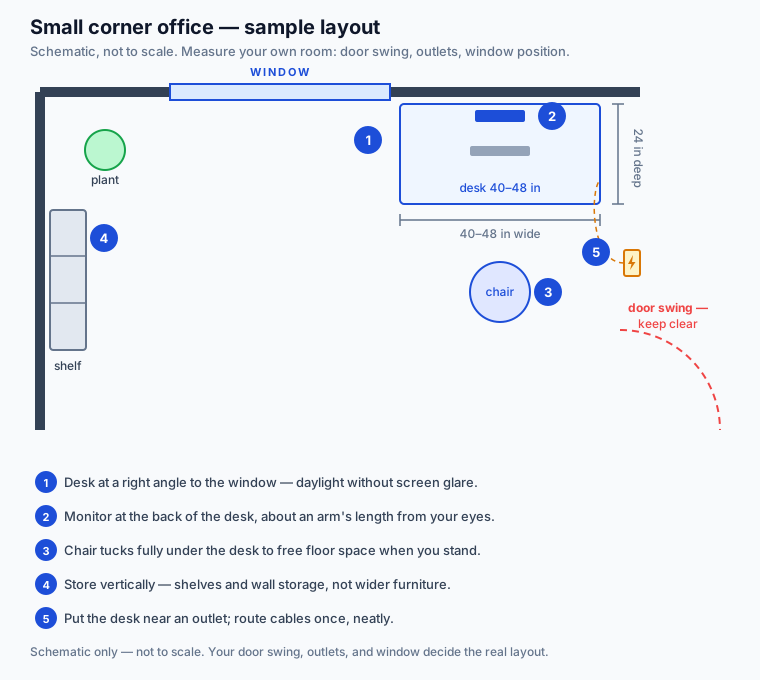
- Measure the room, the door swing, and the outlets. Nothing kills a layout like a desk blocking the door’s arc — and the desk wants to live near power.
- Take the brightest usable corner. Place the desk at a right angle to the window, not facing it and not with your back to it. You get daylight without glare on the screen.
- Size the desk to the work. 32 inches of width fits a laptop plus a notebook; a monitor plus keyboard wants 40–48 inches. And mind the depth — 20 inches feels cramped within a week, while 24 or more stays comfortable.
- Sketch it on paper before moving furniture. Cut paper rectangles for the bed, desk, and dresser and rearrange those — rearranging paper is free.
Small rooms don’t limit good setups — they punish vague ones. Our guide to setting up a home office in a small bedroom walks through seven layouts that work in real rooms — the bright corner, the “cloffice” (a closet converted into a closeable office nook), and the floating fold-down desk — with the gear and habits that make each one succeed.
A corner desk for a home office is worth considering — our guide covers the best options.
Which Desk Actually Fits a Small Bedroom?
When floor space is the constraint, the best desk is the one that disappears when you don’t need it.
- Wall-mounted fold-down desks turn any wall into a part-time office. Typical models run about 39.75 inches wide, fold to roughly 5 inches deep, and cost $140–$200 as of October 2026.
- Compact freestanding desks (32–40 inches) suit a spare wall or corner when you can spare the footprint permanently.
- Budget flat-pack desks ($40–$60) prove that a desk’s job is gloriously simple: hold your gear steady at the right height without wobbling.
Corner desks convert dead corner space into a deep work surface, though they demand more floor than a fold-down. Whatever you choose, check depth before width: 24 inches lets the monitor sit at a healthy distance with the keyboard in front.
We compared the best desks for small bedrooms — fold-down, compact, and corner — with real dimensions and US street prices, so you can match the desk to your wall.
How Much Should a Home Office Setup Cost?
Three honest budget tiers, each capable of a genuinely comfortable setup — the difference is how much legwork and compromise each demands. Prices are typical US street prices as of October 2026.
| Setup tier | Typical total | What you get | Best for | Main trade-off |
|---|---|---|---|---|
| Under-$300 used/DIY build | ~$300 | Secondhand ergonomic chair ($50–$150), used 24-inch monitor ($50–$75), ~$29 flat-pack desk | The tightest budgets | Time spent hunting deals and assembling |
| Under-$500 new build | ~$475 (parts list totals $407–$538) | New task chair ($130–$160), 24-inch 1080p IPS monitor ($110–$140), 47-inch desk ($80–$110) | Best value for most people | Basic chair; no standing desk at this tier |
| Under-$1,000 build | ~$800–$1,000 | Ergonomic mesh chair ($250–$400), 27-inch 1440p monitor ($200–$300), sturdy desk ($80–$150) | Daily long-hour use | Requires discipline to allocate well |
All three tiers follow one rule: spend where your body makes contact, save where it doesn’t. The chair takes the biggest slice, the monitor the second — the chart below shows that priority at two tiers, from our own guides’ parts lists.

Where to read the full breakdowns:
- Our home office setup under $500 is a complete parts list with approximate street prices, built around one rule: spend where your body makes contact.
- Our home office setup under $1,000 shows where extra dollars change daily life (chair, monitor) and where budget options are quietly excellent (desk, peripherals, lighting).
- If even $500 feels steep, our 21 small home office ideas on a budget build a working setup for under $300 — every idea costs $70 or less.
- Our budget home office setup guide for remote workers lays out three complete shopping lists — roughly $300, $650, and $900 — so you can pick your tier and upgrade later.
Timing a full setup for Black Friday week (Nov 27–30) saves $100–$250 on the big-ticket items — our Black Friday home office deals guide has the bands.
How Do You Set Up Ergonomics in a Tight Space?
Ergonomics is geometry, not furniture. A $150 chair adjusted correctly beats a $600 chair left at factory settings — and every adjustment below costs nothing.
- Screen: top at or just below eye level, about an arm’s length away. A $20–$30 monitor riser or laptop stand plus an external keyboard gets you there.
- Keyboard: home row at or just below elbow height, elbows near 90 degrees, forearms roughly parallel to the floor. Keep it flat or tilted slightly away — skip the flip-out feet.
- Keyboard distance: about a fist’s width (4–6 inches) from the desk edge, so wrists stay straight instead of bending upward.
- Mouse: right beside the keyboard at the same height, close enough that your upper arm hangs relaxed at your side.
- Chair: feet flat on the floor (or on a footrest), thighs roughly parallel to it, lumbar support touching your lower back.
Pain is a slow feedback loop — by the time your neck complains, the cause is usually a screen sitting two inches too low.
Run through our 15-point home office ergonomics checklist in order — most discomfort comes from small misalignments, each taking minutes to correct once you know what to look for. For exact numbers, our keyboard and mouse positioning guide gives the heights, angles, and distances to apply today — sitting, standing, or laptop-on-couch.
How Do You Stay Productive When Your Office Is Your Bedroom?
The productivity risk of a bedroom office isn’t the size — it’s the blur. When work and sleep share a room, your brain needs physical cues for which mode it’s in:
- Close it. A cloffice with doors, a folding screen, or a curtain gives the workday a visible ending — the best trick for work-life separation in a bedroom.
- Light it differently. Bright, cool task light for work; warm and dim after. Your brain reads the difference.
- Shut it down. A five-minute end-of-day ritual — clear the desk, close the laptop, change the lighting — beats willpower for actually stopping work.
- Protect the five fundamentals. Chair, screen height, input height, lighting, cables. Get those right at any budget and you’ll outperform an expensive setup that gets them wrong.
Our work-from-home desk setup guide for productivity covers the five fundamentals that matter more than money, with complete setups by budget to use as a shopping list or sanity check.
Our guide shows how to soundproof your home office.
The Nine Guides Behind This Hub
Start with the guide that matches your situation:
Printer stands are worth considering — our guide covers the best options.
- Home office in a small bedroom — seven layouts for real 10×10 rooms, from the bright corner to the cloffice.
- Desks for small bedrooms — six compact and fold-down picks with dimensions and prices.
- 21 small home office ideas on a budget — a complete tiny workspace for under $300, every idea $70 or less.
- Budget setup for remote workers — three complete shopping lists at ~$300, ~$650, and ~$900.
- Home office setup under $500 — the complete new-gear parts list that actually works.
- Home office setup under $1,000 — where to spend vs. save when the budget loosens.
- WFH desk setup for productivity — the five fundamentals that matter more than money.
- Home office ergonomics checklist — 15 fixes to work through in order, most of them free.
- Keyboard and mouse positioning — exact heights, angles, and distances for pain-free typing.
FAQ
Can you fit a real home office in a 10×10-foot bedroom?
Yes. A 40-inch desk in a corner plus a chair that tucks underneath claims roughly 12 square feet — the rest stays a bedroom. The best layouts steal dead space: the corner by the window, a converted closet, or a fold-down desk that vanishes after hours.
What’s the minimum desk size for working from home?
For a laptop and notebook, 32 inches wide is workable; a monitor plus keyboard wants 40–48 inches with at least 24 inches of depth. Below that, the screen sits too close and the keyboard crowds the edge — depth is the dimension most people underestimate.
Is a $500 home office setup actually comfortable?
Yes, if the chair and monitor get budget priority. Our under-$500 parts list puts roughly $130–$160 into a task chair with lumbar support and $110–$140 into a 24-inch IPS monitor — your body’s two full-time contacts. A desk just needs to be stable.
Do I need a standing desk in a small space?
No. A standing desk is a worthwhile upgrade, but comfort comes from the chair, screen height, and input position — all achievable seated. Compact standing desks exist for small rooms if you want to stand later, but none of them fix a bad chair.
How do I keep work from ruining my sleep?
Give the workday a physical ending: close the closet doors or fold the desk away, switch to warm dim lighting, run a short shutdown ritual. Shared square footage is fine — work and sleep just can’t share the same cues.
What’s the single highest-impact ergonomic fix?
Raise the screen so the top sits at or just below eye level, about an arm’s length away. Most neck and shoulder complaints trace back to hours of looking down at a laptop — a $20–$30 stand plus external keyboard and mouse fixes it in an afternoon.